Lab1: Building a HTTP Server from First Principles
Introduction
In this lab, you will demystify the World Wide Web. You won’t be using frameworks like Flask, Django, or Express. Instead, you will build a web server from scratch using Raw Sockets.
The Goal: Build a server that listens for connections, parses raw HTTP text, and maintains a persistent count of how many times it has been accessed.
The Theory
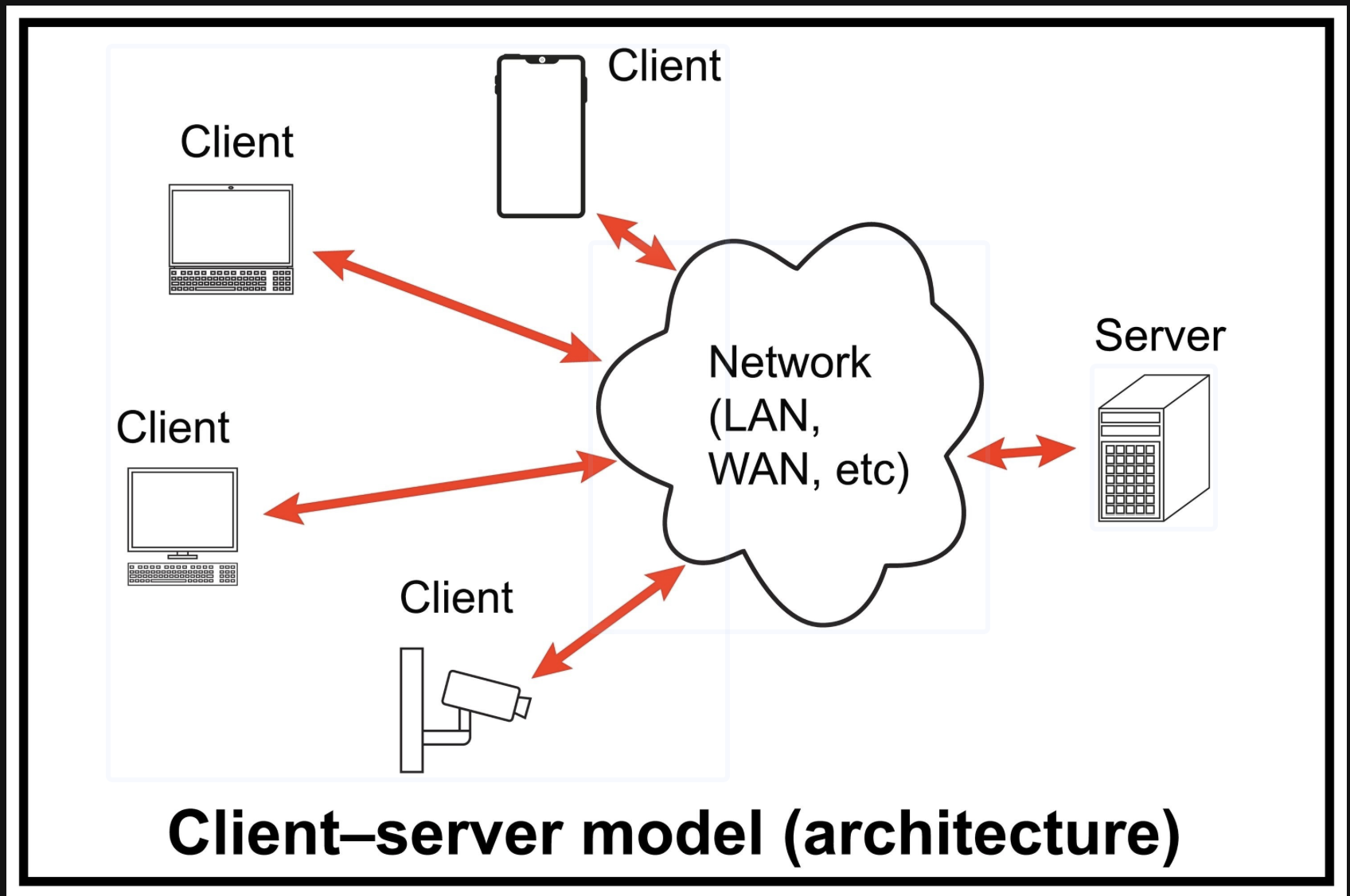
At its core, the Web is just text sent over a TCP connection.
Client (Browser): Opens a connection and sends a text block (Request).
Server (You): Accepts connection, reads text, sends a text block back (Response), and closes the connection.
Setup & Tooling
Using uv (Python Manager)
We recommend using uv to manage your Python environment. It ensures you are running the correct version without messing up your system Python.
- Install uv (if not installed):
curl -LsSf https://astral.sh/uv/install.sh | sh - Create your file: Create a file named server.py.
-
Run your code: Instead of python server.py, use:
uv run server.py
Using nc (Netcat)
Browsers are “too smart”—they hide errors and retry connections automatically. For this lab, we will use Netcat (nc) to act as a “dumb client.” It allows us to manually type HTTP requests and see exactly what your server sends back (bytes and all).
- Command: nc localhost 8000 (Mac/Linux) or ncat localhost 8000 (Windows).
Phase 1: The TCP Handshake
Your first task is to establish a “dial tone.” We need to bind a socket to a port and listen for incoming signals.
Task: Copy the skeleton code below into server.py and fill in the TODOs.
# server.py
import socket

def start_server():
    # 1. Create a socket object (IPv4, TCP)
    # AF_INET = IPv4, SOCK_STREAM = TCP
    server_socket = socket.socket(socket.AF_INET, socket.SOCK_STREAM)

    # Allow the port to be reused immediately (prevents "Address already in use" errors)
    server_socket.setsockopt(socket.SOL_SOCKET, socket.SO_REUSEADDR, 1)

    # TODO: Bind the socket to 'localhost' and port 8000
    # Hint: bind() takes a tuple: ('host', port)

    # TODO: Start listening for connections (backlog of 5)

    print("Server running on http://localhost:8000 ...")

    while True:
        # TODO: Accept a new connection
        # client_connection, client_address = ...

        print(f"Connection received!")

        # Receive raw bytes (buffer size 1024)
        request_data = client_connection.recv(1024).decode('utf-8')
        print(f"--- Received Request ---\n{request_data}\n------------------------")

        # Close connection immediately (for now)
        client_connection.close()

if __name__ == '__main__':
    start_server()
🧪 Test It
- Run the server: uv run server.py
- Open a new terminal window.
- Run Netcat: nc localhost 8000
- Type Hello and hit Enter.
- Observation: Your server should print “Hello” and then exit.
Phase 2: Dissecting the Request
When a browser connects, it doesn’t just say “Hello”. It sends a specific format.
Task: Update your loop to inspect the request. We need to know what the user wants (the Path).
- Restart your server.
- Open your web browser and go to http://localhost:8000.
- Look at your terminal output. You will see something like:
GET / HTTP/1.1
Host: localhost:8000
User-Agent: Mozilla/5.0...
Coding Challenge: Implement a parse_request function that extracts the Path (e.g., / or /favicon.ico) from the raw string.
def parse_request(request_data):
    if not request_data:
        return ""
    # TODO: Split the string into lines
    # TODO: Take the first line ("GET / HTTP/1.1")
    # TODO: Split by spaces and return the middle part ("/")
    return path
Phase 3: The Protocol of Politeness (Response)
If you visit your server in a browser now, it spins forever. Why? Because you never sent a response back. The browser is still waiting for you to say “OK”.
The Rules of HTTP Response:
- Status Line: HTTP/1.1 200 OK
- Headers: Key-value pairs (like Content-Type).
- The Separator: A blank line (\r\n\r\n) must separate headers from the body.
- Body: The actual HTML or text.
Task: Implement the generate_response function and use it in your loop.
def generate_response(content, status_code="200 OK"):
    header = f"HTTP/1.1 {status_code}\r\n"
    header += "Content-Type: text/html\r\n"
    # TODO: Calculate Content-Length (It is crucial!)
    # header += f"Content-Length: {???}\r\n"

    header += "\r\n" # The blank line
    response_str = header + content
    return response_str.encode('utf-8') # Send bytes, not strings
Update your loop:
    # ... inside while loop
    path = parse_request(request_data)

    response = generate_response("<h1>Hello from Python!</h1>")
    client_connection.sendall(response)
    client_connection.close()
🧪 Test with nc
Run nc localhost 8000. You won’t see anything immediately. Type: GET / HTTP/1.1 and hit Enter twice. You should see the full headers and HTML returned.
Phase 4: The Logic (Visitor Counter)
Now, let’s make the server dynamic. We want to display: “This page has been accessed X times.”
The Hard Problem: Browsers request /favicon.ico automatically. If you simply increment a counter every time a connection opens, your visitor count will increase by 2 (or more) for every single refresh!
Task:
- Create a global variable VISITOR_COUNT = 0.
- Inside your loop, check the path returned by your parser.
- IF path is /: Increment counter, return the HTML with the count.
- IF path is /favicon.ico: Return a 404 Not Found status code (do not increment).
- ELSE: Return 404.
Submission
Expected Output:
When I visit localhost:8000 in Chrome:
- First refresh: “Accessed 1 times”
- Second refresh: “Accessed 2 times”
Currently, your server is Single Threaded.
- Add import time and time.sleep(5) inside your handler.
- Try to open the page in two tabs at once.
- Observe: The second tab won’t load until the first one finishes.
- Fix: Use the threading library to handle each client in a separate thread so multiple people can visit at once.